The Indonesian Tourist eVisa (C1) is the most convenient way for foreigners to visit Indonesia for tourism, family visits, or short-term leisure stays. It allows travelers to apply entirely online before arrival, avoiding embassy visits or visa-on-arrival queues.
This 2026 guide explains how to apply for the C1 eVisa step-by-step, including eligibility, requirements, fees, and common mistakes to avoid.
Key Takeaways
- Apply online through https://evisa.imigrasi.go.id/
- Valid for 60 days upon entry
- Extendable up to 180 days total
- Single-entry visa (cannot be reused after leaving Indonesia)
- Processing time: 3–10 working days
- Overstaying results in fines of IDR 1,000,000 per day
Table of Contents
What Is the Indonesia C1 Tourist eVisa?
The C1 eVisa is an electronic tourist visa issued by the Indonesian Directorate General of Immigration. It allows foreigners to enter Indonesia for tourism, family visits, or short-term leisure activities.
Unlike the Visa on Arrival (VOA), the C1 eVisa must be applied for before traveling and offers a longer initial stay period.
Key features:
- Valid for 60 days
- Extendable twice (up to 180 days total)
- Single-entry only
- Entirely online application process
Who Can Apply for a C1 eVisa?
The C1 eVisa is available to citizens of most countries that have diplomatic relations with Indonesia. It’s ideal for travelers who:
- Plan to stay longer than 30 days
- Want to avoid visa runs
- Prefer to complete the process online before arrival
C1 eVisa vs. Visa on Arrival (VOA)
| Feature | C1 eVisa | Visa on Arrival (VOA) |
|---|---|---|
| Application | Online before arrival | At airport upon arrival |
| Initial Stay | 60 days | 30 days |
| Extensions | Up to 180 days total | Up to 60 days total |
| Entries | Single | Single |
| Best For | Longer stays, family visits, remote workers | Short trips, tourists |
Step-by-Step Guide to Applying for the C1 eVisa
1. Visit the official immigration website of indonesia https://evisa.imigrasi.go.id/
That’s the only website to apply any indonesian evisa. Make sure to not apply on any third party website.
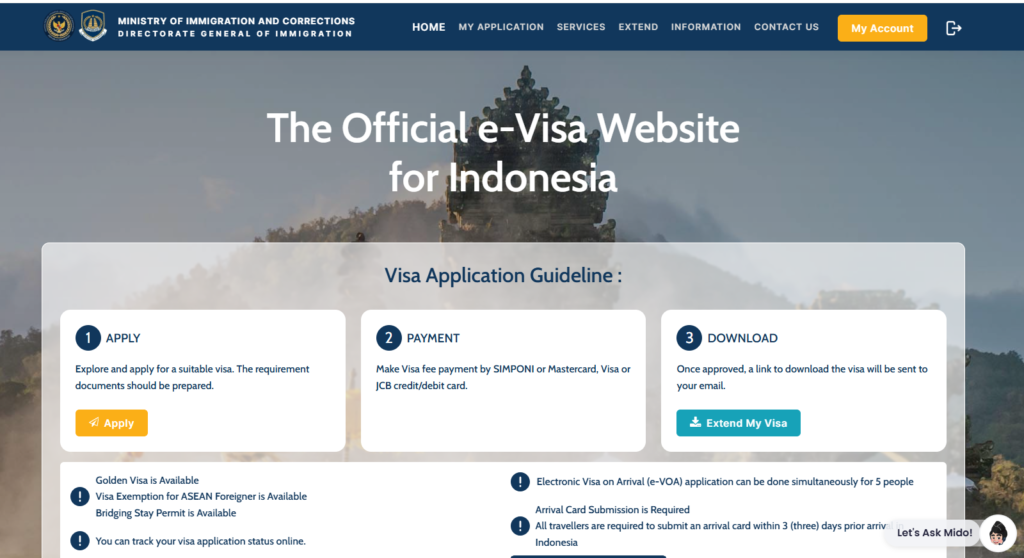
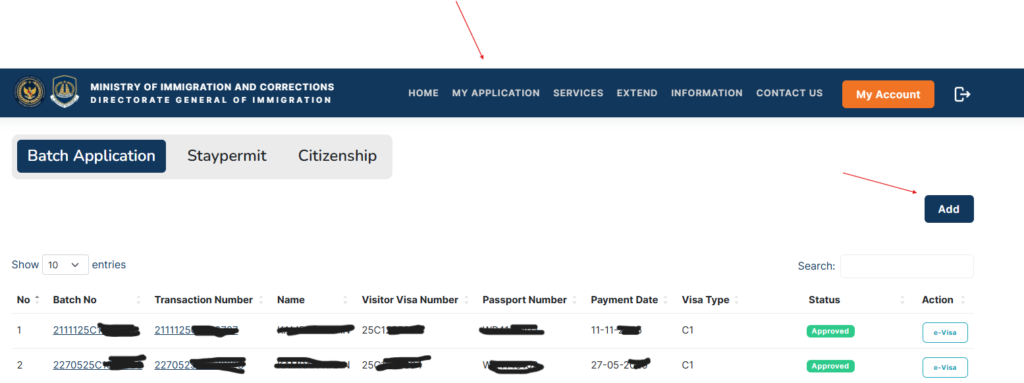
2. Go to MY APPLICATION in the menu. Click on Add button
3. You will see many dropdowns to select from. If you are applying for tourist C1 evisa, Please select the choices as it is mentioned in this image.
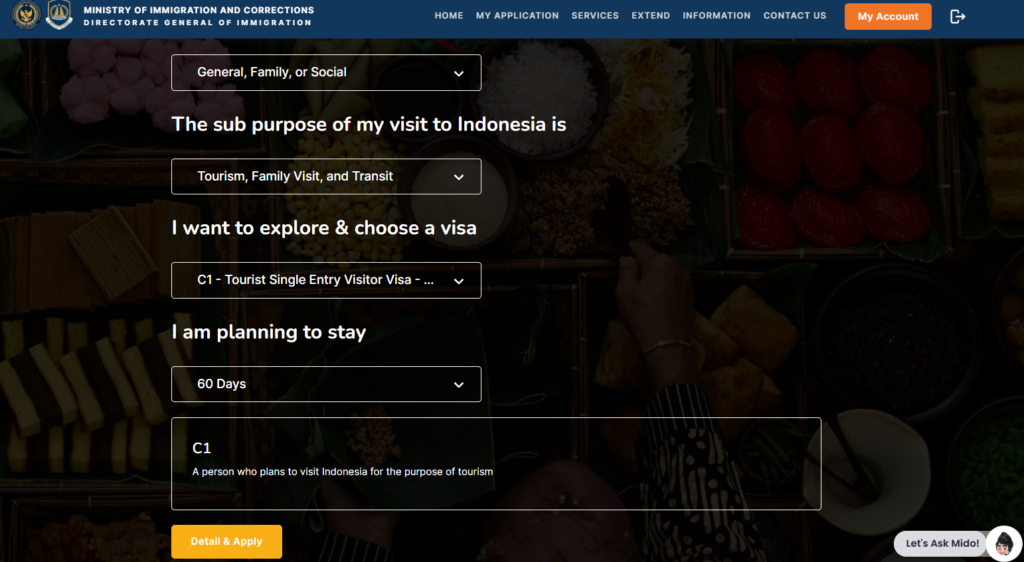
- Choose your nationality
- Select General, Family or Social option for main purpose dropdown
- Select Tourism, Family Visit, and Transit option for sub purpose dropdown
- Since this article is about applying C1 tourist eVisa, Please choose this visa.
- C1 visa is valid for 60 days.
- Click on Details & Apply button.
- You will see all the details regarding the visa. Please read it carefully and click Apply
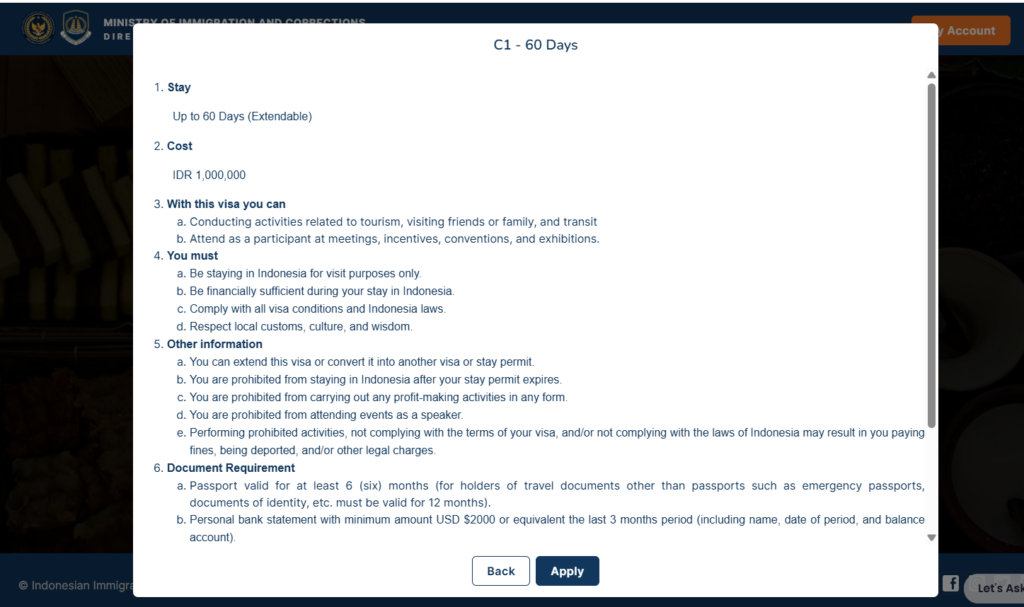
- After you click on Apply. You will see below screen. Here you need to upload only 2 files.
- Please upload your passport bio data page photo (Valid at least 6 months before applying visa)
- Please upload your passport size picture in white background.
Note: Please follow instructions on the right side to upload the correct photos and to avoid any delays.
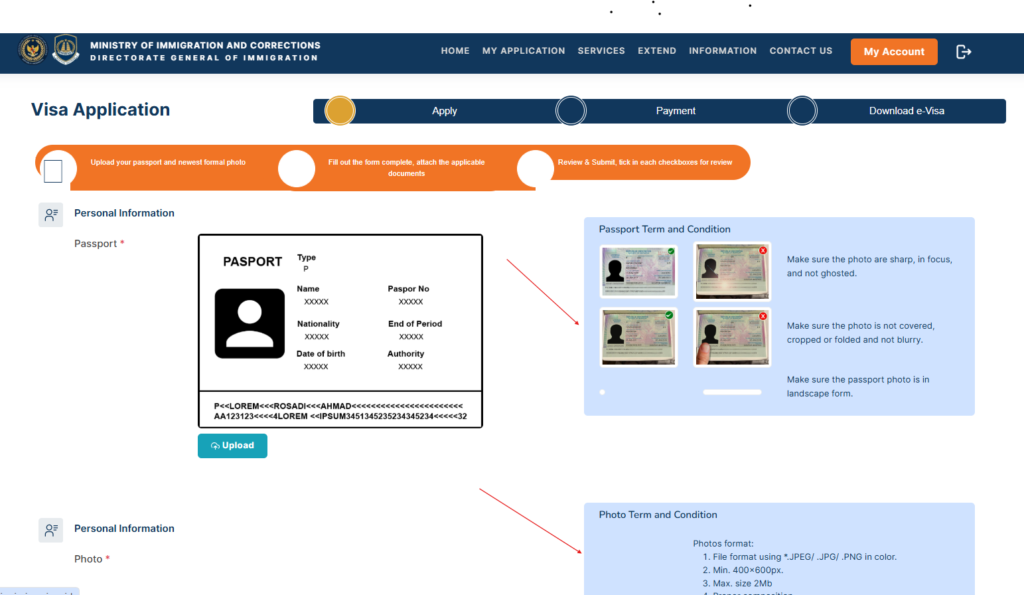
- Please click on Next button after uploading both files.
- Next screen you will is attached below
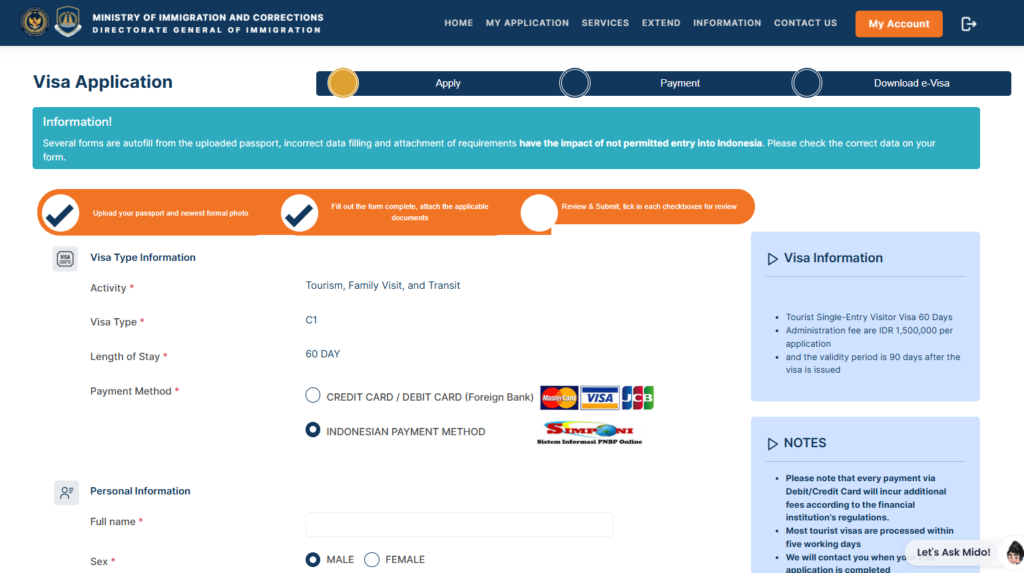
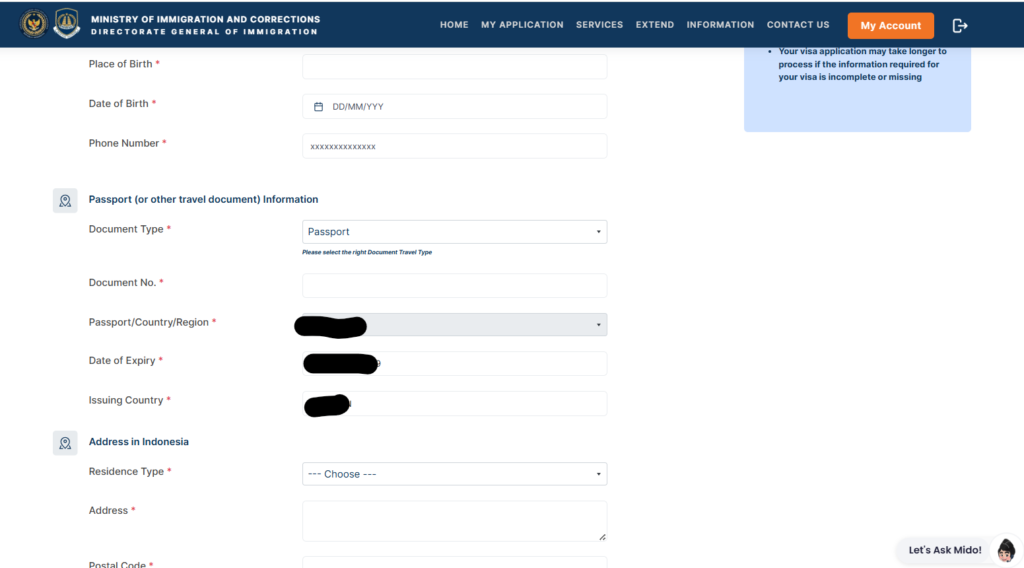
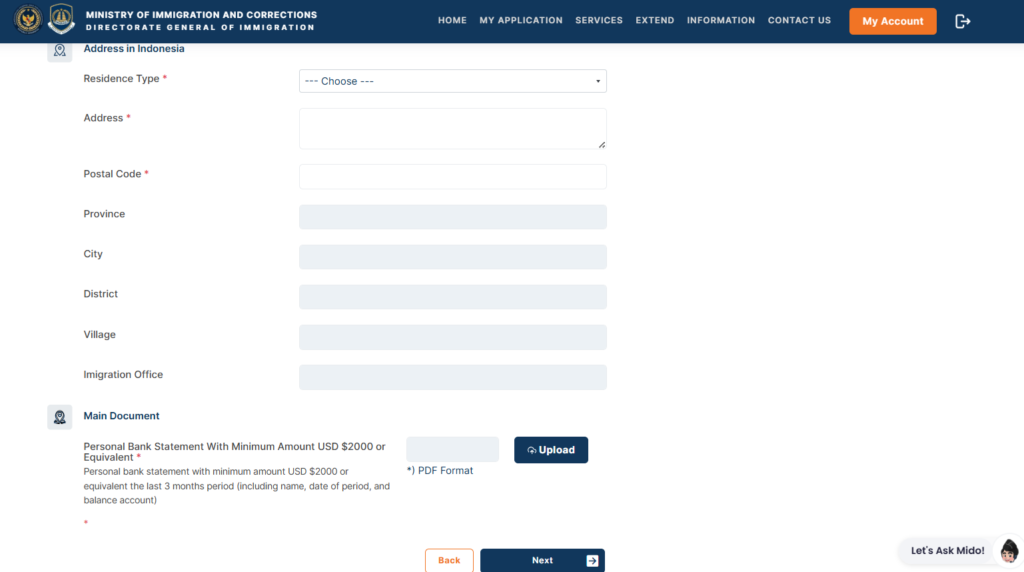
- Please carefully fill out the form.
1. Choose payment type (card or indonesian payment)
2. Fill Personal Information.
3. Fill Passport Information.
4. Fill Address in Indonesia.
5. Upload pdf of 3 months Bank Statement. - Please click on Next after you fill the form. It will direct you to pay the visa fee.
After you pay the Visa Fee, It will take 5 working days to process the Application.
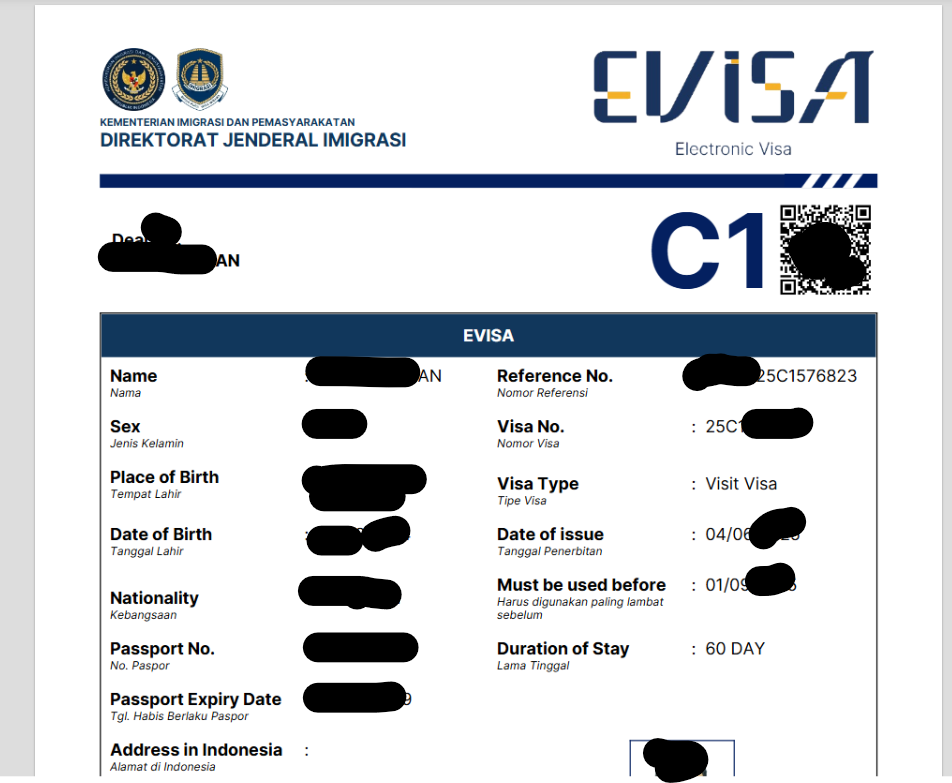
You will receive the eVisa on your provided email address, You can also download visa from the immigration website.
Related Guides
- Indonesia Visa on Arrival (VOA) Guide for Foreigners
- How to apply Indonesian Tourist eVisa (C1)?
- How to Extend Indonesia Tourist eVisa C1 (2026 Complete Guide)
Common Mistakes to Avoid
- Incorrect Passport Details
Even small errors can cause rejection. Double-check all entries. - Expired Passport
Your passport must be valid for at least 6 months from your arrival date. - Unclear Document Uploads
Blurry or incomplete uploads often delay processing. - Late Application
Apply at least 10 days before your planned travel date. - Overstaying
Overstaying results in fines of IDR 1,000,000 per day and possible deportation.
Frequently Asked Questions
How long does it take to get a C1 eVisa?
Usually 3–10 working days, depending on immigration workload.
Can I apply for the C1 eVisa while in Indonesia?
No. It must be applied for before entering Indonesia.
Can I work on a C1 eVisa?
No. The C1 eVisa is strictly for tourism and family visits.
Can I extend my C1 eVisa?
Yes. It can be extended twice, each for 60 days.
Can I re-enter Indonesia with the same visa?
No. The C1 eVisa is single-entry only.
Final Thoughts
The Indonesia C1 Tourist eVisa is the easiest and most flexible way to visit Indonesia for up to six months. The online process is straightforward, and extensions can be done without leaving the country.
To ensure a smooth experience, apply early, upload clear documents, and always use the official immigration website. With proper preparation, your Indonesian adventure can begin stress-free.
To explore more, Visit the YouTube Channel Living Indonesia Official – YouTube
Book cheap flights, hotels ferries, trains, taxi at 12GO